A Comprehensive Overview of Modern Ergonomic Workstations and High-Performance Desk Setups in the Era of Remote Work

The evolution of the modern home office has accelerated significantly over the past half-decade, driven largely by the global shift toward remote and hybrid work models. Professionals are increasingly investing in sophisticated, ergonomic, and aesthetically cohesive workspace setups to maximize daily productivity, protect physical health, and enhance overall work satisfaction. Recent trends within technology communities—such as the popular Maclife enthusiast groups—highlight a growing consumer preference for modular displays, precision peripheral ecosystems, and high-fidelity audio equipment integrated seamlessly into personal workspaces. This report examines the components of a contemporary high-end workstation, analyzing the ergonomic, technological, and financial implications of outfitting a professional home office.
The Rise of Modular Multi-Monitor Configurations in Hybrid Workspaces
A fundamental component of the modern productivity desk is the multi-monitor array. Driven by trends popularized within tech-focused online communities, dual-screen setups have transitioned from corporate environments into residential home offices. Users frequently opt for portable or secondary monitors—such as the UP600 model series—acquired during promotional sales periods following major seasonal holidays.

From a hardware perspective, these secondary panels generally offer sufficient resolution and color reproduction for standard office workflows, content consumption, and multitasking. However, industry analysts note a distinct trade-off in build quality within the budget-to-mid-tier portable monitor market. While chassis construction is often robust, connection ports—particularly USB-C interfaces—can exhibit mechanical vulnerability under frequent strain. Ergonomic specialists recommend establishing a semi-permanent workstation layout where cables are connected once and left undisturbed to minimize wear on delicate internal solder joints and port receptacles.
Ergonomic Peripherals and Wrist Health: The Magic Ecosystem and Delta Hub Integration
Peripheral selection plays a critical role in mitigating repetitive strain injuries (RSIs) among desk-bound professionals. The combination of Apple’s Magic Keyboard with Touch ID and Numeric Keypad, paired with high-precision pointing devices like the Logitech MX Master 3s, represents a gold standard for aesthetic minimalism and functional efficiency in macOS environments. The inclusion of biometric security via Touch ID streamlines authentication processes, reinforcing workspace security without sacrificing workflow speed.
To combat the physiological toll of extended mouse usage, users are increasingly turning to specialized ergonomic accessories. Among these, the Delta Hub Carpio wrist rest has emerged as a popular, albeit premium-priced, intervention. According to occupational health studies, prolonged wrist extension and continuous pressure on the carpal tunnel significantly increase the risk of nerve compression disorders. Ergonomic accessories designed to elevate the palm and facilitate neutral wrist alignment help distribute pressure more evenly across the hypothenar eminence. While the initial financial outlay for specialized ergonomic gear can be relatively high, safety engineers and workplace wellness advocates view these investments as essential preventative measures for long-term musculoskeletal health.

Acoustic Engineering at the Desk: Integrating Studio-Grade Monitors and Subwoofers
Beyond visual and tactile ergonomics, the auditory environment of the home office has undergone a major transformation. Professionals who engage in multimedia production, content creation, or casual audio mixing are increasingly bypassing conventional consumer computer speakers in favor of professional studio monitors.
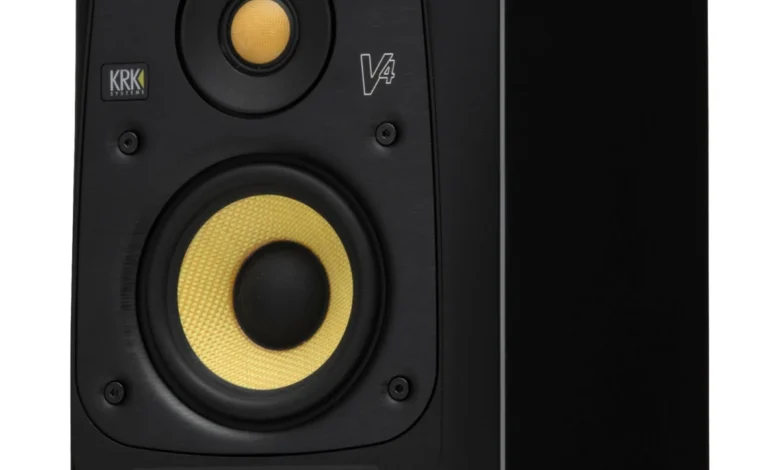
Configurations featuring studio monitors such as the KRK V4S4 paired with an 8-inch subwoofer (KRK 8s) demonstrate a convergence between professional audio production tools and high-end consumer desk setups. Traditionally utilized in recording studios for flat-response audio mastering, these active monitors deliver exceptional dynamic range and low-frequency clarity. Many users simplify their signal chains by connecting audio interfaces or direct 3.5mm auxiliary cables straight from their host computers, eliminating the latency and complexity of external mixing consoles for everyday use. However, acoustic engineers caution that placing high-output studio monitors in untreated residential rooms can introduce acoustic resonance and phase cancellation issues, suggesting that room treatment is a necessary consideration for optimal sound reproduction.
The Lifecycle and Adaptive Reuse of Legacy Computing Hardware

An interesting sub-trend in modern desk curation is the adaptive reuse of legacy computing hardware. Devices such as the 2011 MacBook Pro—often upgraded with modern solid-state drives (SSDs) and expanded RAM configurations—frequently find a second life in contemporary workspaces.
While aging hardware may no longer support the rigorous demands of modern software development or heavy video editing, these legacy machines serve valuable secondary functions. Placed on vertical stands or integrated via desk arms, older laptops are frequently repurposed for ambient tasks, such as monitoring auxiliary communication channels (e.g., Telegram), displaying system dashboards, or serving as minimalist design elements. This practice aligns with broader sustainability initiatives in the technology sector, extending the operational lifecycle of electronic devices and reducing electronic waste.
Structural Foundations: DIY Workbenches and VESA Arm Integration
The physical foundation of any advanced workstation relies heavily on desk construction and display mounting systems. Do-It-Yourself (DIY) workbenches, constructed from heavy-duty butcher block countertops or reinforced timber paired with motorized standing desk frames, have become the preferred choice for enthusiasts seeking durability and customization.

To maximize usable surface area and achieve optimal ergonomic viewing angles, users routinely employ articulated VESA monitor arms. These mounting systems clear valuable desk real estate, allowing for precise height, tilt, and rotation adjustments. Industry standards recommend positioning the top edge of a computer monitor at or slightly below eye level, with the screen tilted backward between 10 and 20 degrees to reduce neck strain and ocular fatigue.
Economic and Industry Implications of the Premium Home Office Market
The sustained demand for high-end workspace accessories reflects a broader economic shift toward consumer investment in the home environment. Market research indicates that global sales of ergonomic furniture, premium peripherals, and home office audio-visual equipment experienced exponential growth following the widespread adoption of remote work policies.
Manufacturers have responded by introducing modular, consumer-friendly variants of commercial-grade equipment. This democratization of professional gear allows remote workers to replicate—and in many cases exceed—the ergonomic and technological capabilities of traditional corporate offices. However, market analysts warn that the proliferation of premium accessories also widens the digital and ergonomic divide between well-funded professionals and those relying on budget alternatives.

In conclusion, the modern desk setup is no longer a haphazard collection of office supplies, but rather a carefully curated ecosystem of technology, ergonomics, and personal style. From modular multi-monitor arrays and precision peripherals to studio-grade acoustics and sustainable hardware repurposing, today’s workspaces are engineered to optimize both human well-being and digital productivity in an increasingly connected world.