Instagram Brings Edits to Mac: A Strategic Move to Challenge CapCut and Redefine Desktop Video Creation for Creators

The landscape of digital content creation has undergone a significant shift as Meta formally expands its ecosystem beyond mobile screens. On November 5, Instagram announced the official launch of a dedicated desktop version of its video editing application, Edits, tailored specifically for macOS users running Apple Silicon processors (M1 chips and later). This strategic release marks a departure from mobile-exclusive editing tools, providing creators with a robust workspace equipped with physical keyboards, mouse precision, and expansive multi-monitor setups. By bridging the gap between casual mobile posting and professional studio environments, Instagram is directly positioning Edits as a formidable competitor to industry giants like CapCut, while simultaneously attempting to streamline the demanding workflow of modern short- and long-form content producers.
Background Context and the Evolution of Instagram Edits
Historically, short-form video creation—exemplified by Instagram Reels and TikTok—has been tethered to the constraints of mobile device interfaces. While smartphones have grown exponentially in processing power, complex video production tasks such as multi-track arrangement, precise keyframing, and advanced color grading often feel confined on a 6-inch display. Recognizing these structural bottlenecks, Meta initially introduced Edits as a mobile solution to simplify video assembly. However, as creator expectations matured and platforms demanded higher production values, the demand for desktop integration became glaringly apparent.

The transition to macOS represents a deliberate effort to address these hardware limitations. By optimizing the application for Apple Silicon architecture, Instagram ensures that creators can leverage high-performance hardware acceleration, enabling seamless playback and rendering of high-resolution video assets. The desktop iteration is currently available as a free download for macOS users who log in with their existing Instagram credentials, though availability remains restricted to Apple Silicon hardware, leaving Windows users and those on older Intel-based Macs waiting for future updates.
Comprehensive Feature Set and Professional Editing Capabilities
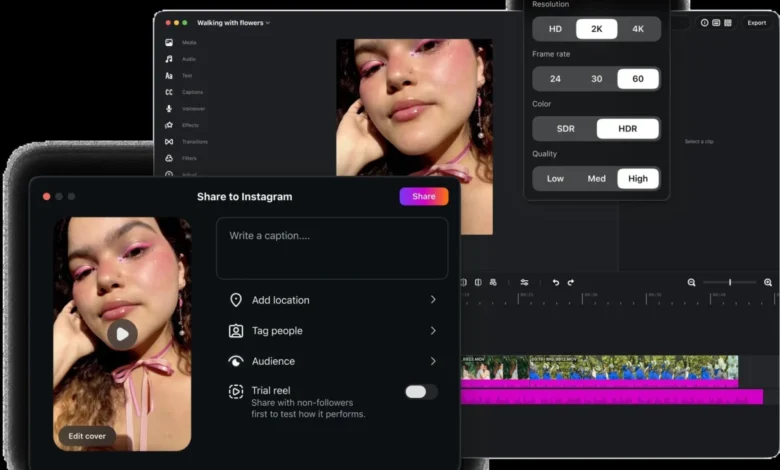
The core strength of the new Mac application lies in its comprehensive desktop-class feature set. Unlike its mobile counterpart, Edits on macOS introduces a multi-layer timeline supported by keyframe controls, granting creators granular manipulation over motion graphics, visual transitions, and precise audio waveforms. This layout allows editors to visually align cuts with audio beats—a fundamental requirement for rhythmic, high-engagement video content.
Color grading capabilities have also received a substantial upgrade. The desktop application integrates advanced color wheels, tone curves, and Log color processing tools. Furthermore, creators are no longer restricted to a limited preset library; the platform now supports the direct import of custom LUTs (Look-Up Tables) and personalized font files. For creators managing strict brand identities, maintaining consistent typography and color treatment across multiple projects offers tangible practical value that far surpasses standard preset applications.

In addition to visual controls, Instagram has integrated an expansive, royalty-free audio library directly into the desktop timeline, accompanied by sound effects, motion graphics, and automated captioning tools that support multiple languages. While the automated captioning feature promises limitless creative potential, industry analysts note that technical terminology and niche industry jargon still require careful manual review by content creators to ensure absolute accuracy.
Workflow Integration: The Bridge Between Mobile and Desktop
Despite the advanced capabilities of the macOS application, the workflow connecting mobile capture to desktop finalization is still evolving. Instagram has confirmed that while fundamental assets such as saved audio preferences and custom typography can transfer between mobile and desktop environments, the ability to seamlessly edit the exact same project simultaneously across both platforms remains a work in progress.
The current workflow architecture allows creators to sync saved resources rather than mirroring entire timeline states across devices. Creators are advised not to rush into treating the desktop app as an absolute replacement for existing professional software suites, but rather as a specialized desktop extension tailored for social-first publishing. Projects can be exported in 4K resolution without watermarks, supporting multiple aspect ratios including both horizontal and vertical formats. This flexibility ensures that footage captured horizontally is not forcefully locked into a single vertical framing paradigm, though manual verification of layout, text placement, and composition remains necessary for every export variant.

Furthermore, the integration extends to direct publishing capabilities. Creators can publish videos directly from the macOS timeline to Instagram, complete with account tagging, precise location pinning, and Trial Reels integration. This unified pipeline eliminates the cumbersome intermediary step of exporting a file from a desktop editor, transferring it to a mobile device, and manually executing the final post.
Market Implications and the Direct Challenge to CapCut
The introduction of Edits for Mac places Instagram in direct competition with established third-party video editors, most notably ByteDance’s CapCut, which has dominated the desktop content creation space in recent years. By offering a clean, watermark-free 4K export capability alongside an integrated creative library and direct platform publishing, Meta is attempting to keep creators within its proprietary ecosystem.
However, industry observers point out that the success of Edits will not solely depend on its feature parity, but on how effectively Meta solves the cross-device synchronization puzzle. Creators who shoot on mobile devices and finish on desktops require friction-free project continuity. While the current version provides a powerful standalone environment, true cross-platform synergy will dictate whether professional creators adopt Edits as their primary hub or continue utilizing diversified, ecosystem-agnostic editing software.

As Instagram continues its weekly update cycle for the application, the desktop version of Edits should be viewed as a foundational step toward a more integrated creator economy. For digital creators seeking an optimized workflow designed specifically to alleviate the ergonomic limits of mobile editing, the arrival of Edits on Mac provides a compelling new tool worthy of serious professional evaluation.