
Apple Officially Releases iOS 27: A Comprehensive Deep Dive Into Performance Enhancements, Siri AI Upgrades, and Hardware Optimization

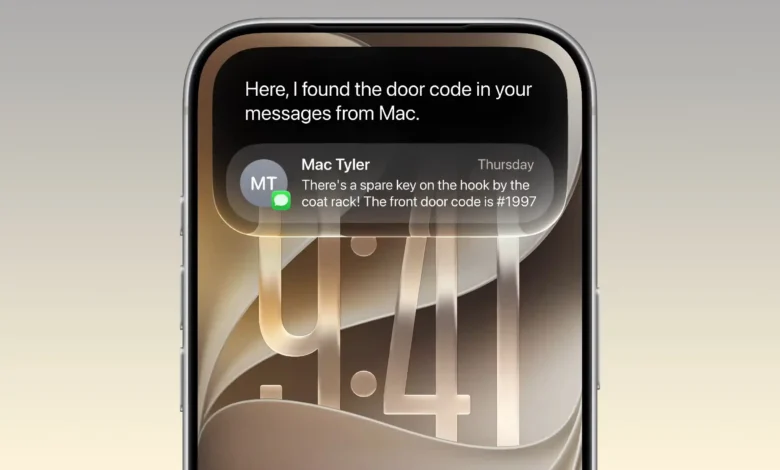
Apple Inc. has officially rolled out iOS 27 to compatible iPhone models worldwide, following its traditional post-launch schedule after the debut of the latest hardware generation. Building upon the foundational design shift introduced by the Liquid Glass interface in iOS 26, the Cupertino-based technology giant has dedicated this software cycle primarily to core experience refinement, system-wide performance tuning, enhanced child safety protocols, and a ground-up reconstruction of Siri powered by advanced artificial intelligence.

As mobile operating systems become increasingly complex, iOS 27 represents a strategic pivot toward stability, efficiency, and contextual intelligence. Industry analysts note that rather than introducing radical aesthetic overhauls, Apple has focused on resolving user-reported friction points while laying the software groundwork for emerging device form factors, such as foldable displays and advanced spatial accessories.
The rollout spans a wide range of hardware, supporting devices from the iPhone 11 series up to the newest flagship lineups. However, advanced artificial intelligence capabilities remain restricted to modern hardware configurations equipped with the A17 Pro processor or newer. With installation packages averaging approximately 20GB depending on the specific device model, the update requires significant storage preparation and system verification.

Rebuilding Siri AI: Contextual Awareness and Multimodal Integration
The most substantial and resource-intensive upgrade in iOS 27 is the complete overhaul of Siri. Departing from legacy voice assistant architectures, Apple has deployed a comprehensive system integrating large language models developed in collaboration with industry partners. This next-generation iteration delivers deep personal context awareness, allowing the assistant to parse photos, emails, messages, notes, and calendars using natural language prompts without requiring exact keyword syntax.
A prominent addition is on-screen content recognition. Users reading articles, reviewing invoices, or browsing documents can summon Siri to immediately summarize the displayed material, generate reminders, or share relevant details with contacts. Furthermore, Apple has introduced a dedicated Siri application designed to archive conversation history, allowing users to pin critical chat threads and synchronize them securely via iCloud.

Within the Camera application, multimodal Siri integration enables real-time visual queries. Users can point their viewfinders at restaurant bills to calculate split group payments, analyze food items for nutritional data, or look up information directly from the camera feed. Additionally, the "Write with Siri" feature dynamically adapts to individual writing styles, formal registers, and punctuation habits to assist in drafting professional correspondence.
Despite these advancements, initial language support remains a primary constraint for international markets. In its initial deployment phase, Siri AI natively supports English, with scheduled expansions for French, Japanese, Korean, Portuguese, and Spanish rolling out in subsequent software patches. Users outside these linguistic regions must adjust their device language and regional settings to English to access the full suite of AI capabilities. Hardware limitations also dictate accessibility, restricting these features to the iPhone 15 Pro, iPhone 15 Pro Max, and the entire iPhone 16 generation and newer.

Liquid Glass Refinement and System-Wide Performance Optimization
The introduction of the Liquid Glass interface in iOS 26 drew mixed reactions from users, particularly regarding transparency levels that occasionally impacted legibility over bright wallpapers. Addressing this feedback, Apple has introduced a granular slider within the Settings menu in iOS 27. Users can now manually adjust interface transparency from ultra-clear to fully opaque. Fine-tuned light refraction and contrast parameters for system icons ensure that the modern aesthetic is preserved without sacrificing long-term visual comfort.
Performance optimization forms a cornerstone of the iOS 27 release. Apple reports that algorithmic scheduling improvements across the CPU lifecycle have resulted in application launch speeds increasing by up to 30%. Furthermore, new photo rendering speeds within the system library have improved by 70%, while AirDrop file transfer speeds have increased by up to 80%. Real-world testing on legacy devices, such as the iPhone 11 and iPhone 12, demonstrates a noticeable reduction in frame drops during primary screen navigation, App Library scrolling, and Control Center deployment.

Connectivity enhancements include the new Connectivity Assist feature, which streamlines transitions between Wi-Fi networks and cellular data (4G/5G). The system eliminates instances where devices persistently cling to weak Wi-Fi signals when moving beyond domestic or office environments. In a long-awaited quality-of-life change, Apple has decoupled the alarm clock volume from the system ringtone volume, preventing sudden and excessively loud alarm notifications.
Advanced Photographic Editing Tools and Expanded Cloud Sharing
The native Photos application on iOS 27 introduces three major AI-driven editing capabilities for devices supporting Apple Intelligence. Spatial Reframing allows users to adjust the virtual camera angle after capture, altering the composition of an image if the initial framing was suboptimal. The Extend tool utilizes generative AI to render and expand surrounding spatial environments, proving useful for straightening tilted horizons or adapting images for lock screen wallpapers. Additionally, the Clean Up object removal tool has been divided into "Fast" modes for minor details and "High Quality" modes for complex boundary regions.

Library management features have been expanded across all supported devices. Users can now lock, rate individual photos or videos, and create dedicated albums containing strictly locally captured media to avoid mixing with downloaded social media content. A separate private vault has also been introduced for secure document storage.
The iCloud Shared Albums platform has received substantial upgrades, enabling Windows PC and Android mobile users to view, upload, and interact with high-resolution photos via a web-based interface, complete with emoji reaction support.

Productivity Enhancements Across Messages, Safari, and Notes
Core productivity and communication applications have received targeted refinements designed to streamline daily workflows. The Messages application no longer halts transmission processes when sending large video files, allowing users to continue typing and chatting while media uploads asynchronously in the background. Messages interrupted by connectivity losses automatically retry upon network restoration, and a settings toggle allows users to convert the audio message recording button into a speech-to-text input tool or hide it entirely to prevent accidental voice note dispatches.
The Safari web browser introduces an "Organize by Topic" feature that automatically groups open tabs into logical categories such as work, travel, or shopping. The new "Notify Me" feature tracks specific web pages and alerts users to changes in pricing, inventory levels, or ticket availability. Tab management has also been streamlined, requiring only a single tap to access the comprehensive tab overview interface.

Apple Notes now supports section linking within long documents and full compatibility with Markdown copy-and-paste formatting, catering directly to writers and content creators.
Overhauled Screen Time and Enhanced Child Safety Protocols
iOS 27 implements the most comprehensive overhaul of the Screen Time framework since its introduction in iOS 12. The setup process for child accounts under the age of 13 has been streamlined into a guided, six-minute onboarding wizard that allows parents to pre-select approved application categories before handing the device to a child.

The "Ask to Browse" feature requires children to submit real-time approval requests to parents when attempting to access unvisited websites, preventing circumvention via built-in browsers when standard applications are restricted. Furthermore, screen time limits are now aggregated by categories—such as Entertainment, Games, or Social Media—rather than requiring individual adjustments per application. Suggested time limits based on pediatric association recommendations are provided automatically based on the child’s age.
Communication Safety protocols are now enabled by default for users under 18. The system not only scans for sensitive imagery but also automatically blurs and blocks depictions of violence and blood within Messages, FaceTime, and shared photo albums.

Health, Accessory Integration, and Hardware-Specific Optimization
The Health application in iOS 27 expands its monitoring capabilities to include tracking and early warning indicators for perimenopause and menopause symptoms, integrated with specialized Fitness+ workout routines.
AirPods users benefit from three-band EQ customization directly within system settings, allowing fine-tuning of bass, mid-range, and treble frequencies. The Home application now supports simultaneous live previews of multiple 4K security camera feeds, alongside natural language clip searches (e.g., searching for specific events like a delivery driver arriving).

For foldable devices, specifically the newly launched iPhone Duo, iOS 27 introduces a completely distinct user interface architecture. The dock, control panels, and navigation elements shift to the lateral edges to facilitate dual-thumb operation. When unfolded, the internal display utilizes a split-screen multitasking interface capable of running two applications simultaneously, dynamically adapting display layouts when the device is folded into a "V" shape on a flat surface.
Deployment Recommendations and Industry Analysis
Industry observers emphasize that iOS 27 represents a mature, stabilization-focused release that addresses historical performance bottlenecks while establishing a robust framework for artificial intelligence and multi-form-factor integration.

Because of the substantial file size and deep system reconfigurations involved, technology specialists recommend that users back up their devices via iCloud or a personal computer and ensure adequate internal storage space before initiating the update process. As the global rollout continues, consumer response will largely depend on the broader geographical and linguistic expansion of Siri AI features in upcoming software iterations.