
Microsoft Promises Search Improvements for File Explorer After User Frustration

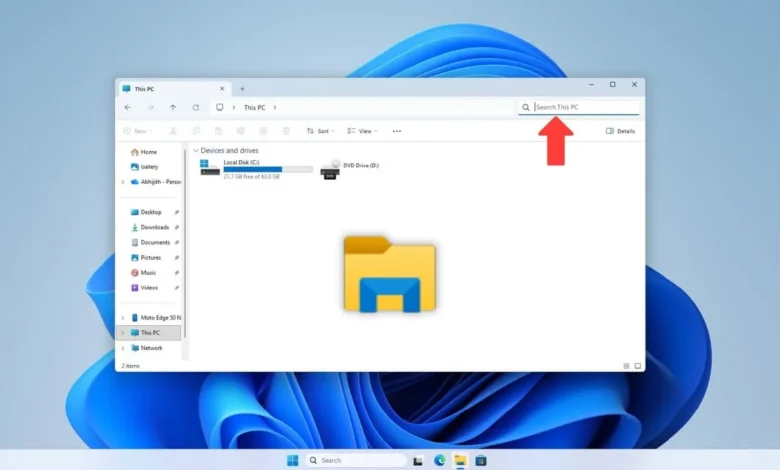
Microsoft has acknowledged widespread user dissatisfaction with the search functionality within Windows File Explorer and has committed to implementing significant improvements. Marcus Ash, a Principal Program Manager for Windows, confirmed that enhancements to the Windows Search experience are underway, with initial updates focusing on the search capabilities within File Explorer, beginning with improvements to searching "This PC."
The current search feature in File Explorer has been a persistent point of contention for many Windows users, particularly with the evolution of Windows 11. While the redesigned File Explorer in Windows 11 brought a more modern aesthetic compared to its Windows 10 predecessor, its search performance has often been described as unreliable and frustrating. Users report inconsistent results, with searches sometimes failing to return expected files even on systems with minimal data, while on other occasions, the search proves to be slow and imprecise. This inconsistency has led to a significant user base seeking third-party alternatives for a more robust file discovery experience.
The announcement comes on the heels of recent positive developments in Windows Search, which have been met with appreciation by some users. The commitment to addressing File Explorer’s search issues signals Microsoft’s intent to consolidate these gains and provide a more unified and efficient user experience across the operating system.
The Longstanding Search Dilemma in Windows
For years, the search capabilities integrated into Windows have been a subject of debate among tech enthusiasts and everyday users alike. While powerful in theory, the practical application has often fallen short of expectations. The File Explorer search, in particular, has been characterized by its sluggishness and propensity to miss relevant files. This has driven many users to rely on alternative solutions.
Spotlight vs. Everything: A User Perspective
Many users draw comparisons to the search functionalities found on other operating systems and third-party applications. The macOS Spotlight search, for instance, is often lauded for its speed and comprehensiveness, capable of quickly indexing and retrieving a wide array of information, including applications, documents, and system settings. While Spotlight has its limitations, it is generally perceived as more responsive than Windows’ native File Explorer search.
However, the performance of Windows File Explorer search is frequently dwarfed by specialized third-party applications. Tools like "Everything," a file-naming utility by voidtools, have set a remarkably high bar. "Everything" is known for its near-instantaneous indexing of filenames on NTFS volumes, allowing users to find files and folders within milliseconds, even on drives with hundreds of gigabytes of data. This level of performance has led to speculation and calls for Microsoft to acquire or integrate such successful third-party solutions directly into Windows.
Underlying Technologies and User Workarounds
The effectiveness of Windows Search is intrinsically linked to its indexing service. For the search function to operate efficiently, the Windows Search Index must be enabled and configured to scan the relevant locations on the user’s storage devices. When enabled, the service creates a database of file names, and in some configurations, file content, allowing for rapid retrieval of search queries.
However, this indexing process is not without its drawbacks. The Search Index service consumes system resources, including RAM and CPU cycles, which can impact system performance, especially on older hardware or systems with traditional Hard Disk Drives (HDDs) rather than Solid State Drives (SSDs). Users who prioritize system performance or who have specific privacy concerns sometimes opt to disable this service altogether, which, predictably, leads to slower and less effective search results.
The Trade-off: Performance vs. Resource Consumption
The decision to enable or disable the Search Index service often represents a trade-off for users. Those who frequently rely on file searches and prioritize speed will likely benefit from keeping the service active, despite the resource overhead. Conversely, users who rarely search for files or who are highly sensitive to system performance may choose to disable it, accepting the compromise in search functionality.
Historical Context and User Sentiment
The current frustration with File Explorer search is not a new phenomenon. Users have expressed their discontent for years, with many pointing to the perceived prioritization of new features over fundamental usability improvements. This sentiment is often contrasted with the approach taken by companies like Apple, which are perceived to focus heavily on user experience and the seamless integration of core functionalities.
This sentiment is echoed in user forums and online discussions where individuals share their reliance on third-party tools to overcome the limitations of Windows’ built-in search. Applications like Listary are frequently mentioned as effective replacements that offer rapid file access and integration with the Windows search ecosystem.
The Search for a Solution: User-Driven Alternatives
The prevalence of third-party search tools highlights a gap in the market that Microsoft has historically struggled to fill with its native offerings. Users often turn to these external applications due to their speed, accuracy, and customizable features, which are perceived to be superior to the built-in Windows search.
Some users also point to the complexity of the Windows indexing service itself. Reports of Windows updates inadvertently breaking or impacting the search index, leading to performance issues or the need for manual re-indexing, contribute to the overall user frustration.
Future Directions and Microsoft’s Commitment
The acknowledgment from Marcus Ash indicates a shift in Microsoft’s approach. The company appears to be recognizing the critical role of efficient file management and search in the overall user experience. The promise of improvements to File Explorer search, starting with "This PC," suggests a phased rollout of enhancements.
The implications of these promised improvements are significant. A more robust and reliable search function within File Explorer could:
- Enhance User Productivity: Users would be able to locate files more quickly, reducing time spent on administrative tasks and increasing overall efficiency.
- Reduce Reliance on Third-Party Tools: Successful integration of advanced search features could dissuade users from seeking external software, simplifying the Windows ecosystem.
- Improve Overall Operating System Satisfaction: A core functionality like search, when performed well, contributes significantly to a positive user perception of the operating system.
The challenges for Microsoft lie in balancing the power and speed of search with system resource utilization and ensuring that the improvements are widely accessible and beneficial to all users, regardless of their hardware. The company’s commitment to addressing this long-standing issue is a positive step towards a more user-centric Windows experience. While the exact timeline for these updates remains unspecified, the confirmation from a Microsoft executive signals that user feedback is being heard and acted upon.
Related posts: